> ## Documentation Index
> Fetch the complete documentation index at: https://docs.listenlabs.ai/llms.txt
> Use this file to discover all available pages before exploring further.
# Conditional Logic
> Show or skip questions based on participant answers to create dynamic, relevant interview experiences
Conditional logic lets you show or skip questions based on how a participant answered an earlier question. This keeps interviews relevant, reduces fatigue, and enables more sophisticated research designs.
***
## How It Works
You set conditions on any question to make it display only when specific criteria are met — based on the answers to earlier multiple-choice or closed-ended questions.
**Example:** Show Question 5 only if the participant selected "Yes" in Question 3.
***
## Setting Up Conditional Logic
1. In the **Editor**, click into the question you want to conditionally show
2. Click **Show advanced settings**
3. Select the earlier multiple-choice question whose answer should trigger the condition
4. Choose the specific answer option(s) that should cause this question to appear
5. Add additional conditions if needed
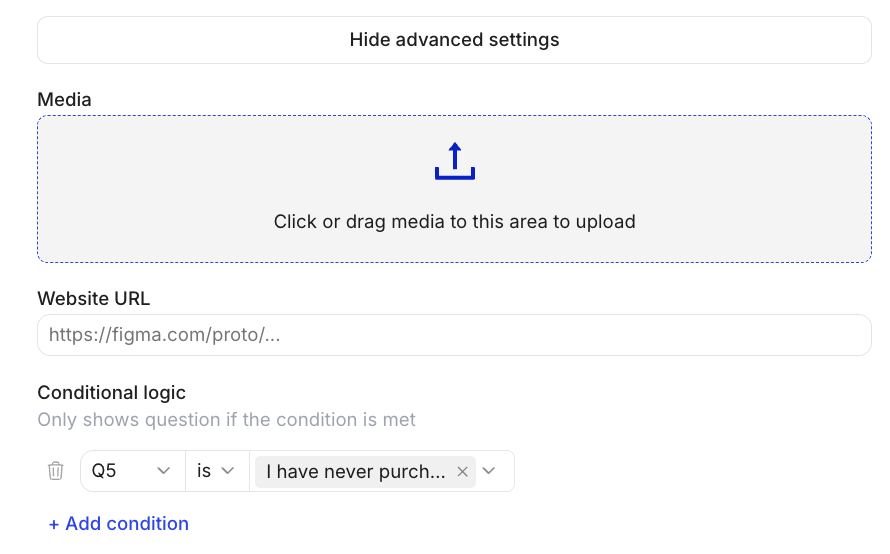 Conditions are evaluated in real time as the participant progresses. If a prior answer doesn't meet the condition, the question is silently skipped — participants never see an empty or broken screen.
***
## Multiple Conditions
You can add multiple conditions to a single question (AND logic — all conditions must be met).
**Example:** Show this question only if the participant is in the US AND selected "Premium" in Q2.
***
## URL Parameters & Recruits
You can also segment sample based on URL Parameters or the recruits in the recruit tab.
**Example:** Show this question only if parameter is "user".
***
## Common Use Cases
* **Concept-specific follow-ups:** Only show questions about Concept A to participants who were assigned Concept A.
* **Experience-based routing:** Ask different questions to customers vs. non-customers.
* **Emotional branching:** Show a "what went wrong?" question only to participants who gave a low rating.
* **Screener reinforcement:** Skip irrelevant discussion guide questions based on screener answers.
Test all conditional paths thoroughly using **"Run from Start"** or **"Open Preview"** before launching. Trace each path to confirm the right questions appear and none are shown incorrectly.
***
Questions about screensharing setup? Email [**support@listenlabs.ai**](mailto:support@listenlabs.ai)
Conditions are evaluated in real time as the participant progresses. If a prior answer doesn't meet the condition, the question is silently skipped — participants never see an empty or broken screen.
***
## Multiple Conditions
You can add multiple conditions to a single question (AND logic — all conditions must be met).
**Example:** Show this question only if the participant is in the US AND selected "Premium" in Q2.
***
## URL Parameters & Recruits
You can also segment sample based on URL Parameters or the recruits in the recruit tab.
**Example:** Show this question only if parameter is "user".
***
## Common Use Cases
* **Concept-specific follow-ups:** Only show questions about Concept A to participants who were assigned Concept A.
* **Experience-based routing:** Ask different questions to customers vs. non-customers.
* **Emotional branching:** Show a "what went wrong?" question only to participants who gave a low rating.
* **Screener reinforcement:** Skip irrelevant discussion guide questions based on screener answers.
Test all conditional paths thoroughly using **"Run from Start"** or **"Open Preview"** before launching. Trace each path to confirm the right questions appear and none are shown incorrectly.
***
Questions about screensharing setup? Email [**support@listenlabs.ai**](mailto:support@listenlabs.ai)