

For text-based translation across 90+ languages, see Localizing Your Study: Auto-Translations
What the Multi-lingual Voice Interviewer Does
When the voice interviewer is enabled, participants hear questions read aloud. This makes interviews more accessible and conversational — particularly valuable for:- Markets where reading in a second language creates fatigue
- Older audiences or those with lower literacy rates
- Mobile studies where audio-first feels more natural than reading
- Studies designed to feel like a natural conversation rather than a survey
Choosing a Language and Voice
Listen offers multiple voice options for each of the 42 supported languages. Voices vary in tone, pacing, and regional accent — so you can choose one that feels authentic for your target audience. (Note: Voice audio is separate from Auto-Translations, which covers ~100 languages for text-based interviews.)How to Configure Voice Settings
- Open your study in the Editor.
- Click the settings icon (wrench) in the left sidebar.
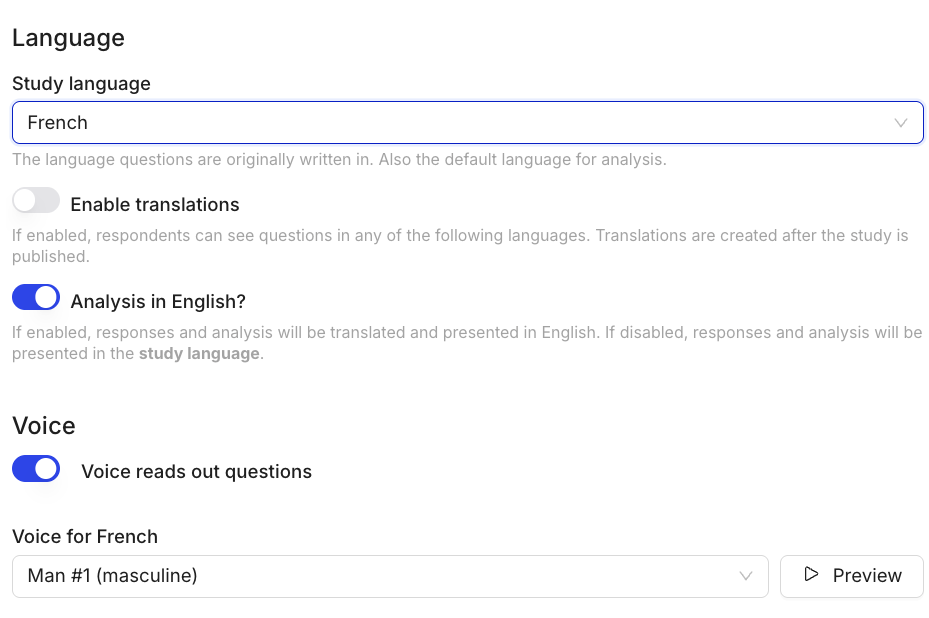
- Navigate to Language & Voice settings.
- Select your target language.
- Preview available voice options and choose the best fit for your study.
-
Save your settings.
Supported Languages
Listen currently supports 40+ languages with voice, including:- Europe: English, French, German, Spanish, Italian, Portuguese, Dutch, Swedish, Norwegian, Danish, Finnish, Polish, and more
- Americas: US English, Brazilian Portuguese, Latin American Spanish, Canadian French
- Asia-Pacific: Japanese, Mandarin, Korean, Hindi, Indonesian, Vietnamese, and more
- Middle East & Africa: Arabic, Hebrew, Turkish, Swahili
Voice vs. Text Interviewer
You can use voice and text interchangeably per study, or set a study-wide default. Text tends to work better for B2B and professional audiences; voice performs better for consumer research, mobile-first studies, and international markets where reading in a second language is a barrier.Anything missing? Let us know at support@listenlabs.ai and we’ll help you out!