

What Are Screening Questions?
Screening questions qualify or disqualify respondents from your survey based on their answers. They help you target your audience more precisely and filter out participants from a broader sample who aren’t a fit.Benefits: Why Use Screening Questions?
- Reach your target audience. Only qualified participants enter your study
- Save time and cost. Filter out unqualified respondents before they take your full study and prevent fraud.
- Improve data quality. Responses come from participants who are relevant to your study.
- Enhance the respondent experience. Participants aren’t asked questions they can’t answer.
How to Set Up Screeners in Listen Labs
- Add a screening section to your study. In your study editor under the “Create” tab, press +Add Screening Section if you don’t have one already.
- Click +Question in your screening section to add a new screener, then write your question.
- Write your qualifying criteria. Use clear answer choices that map directly to your inclusion or exclusion rules.
- Apply logic. Mark which answers should qualify or disqualify a respondent.
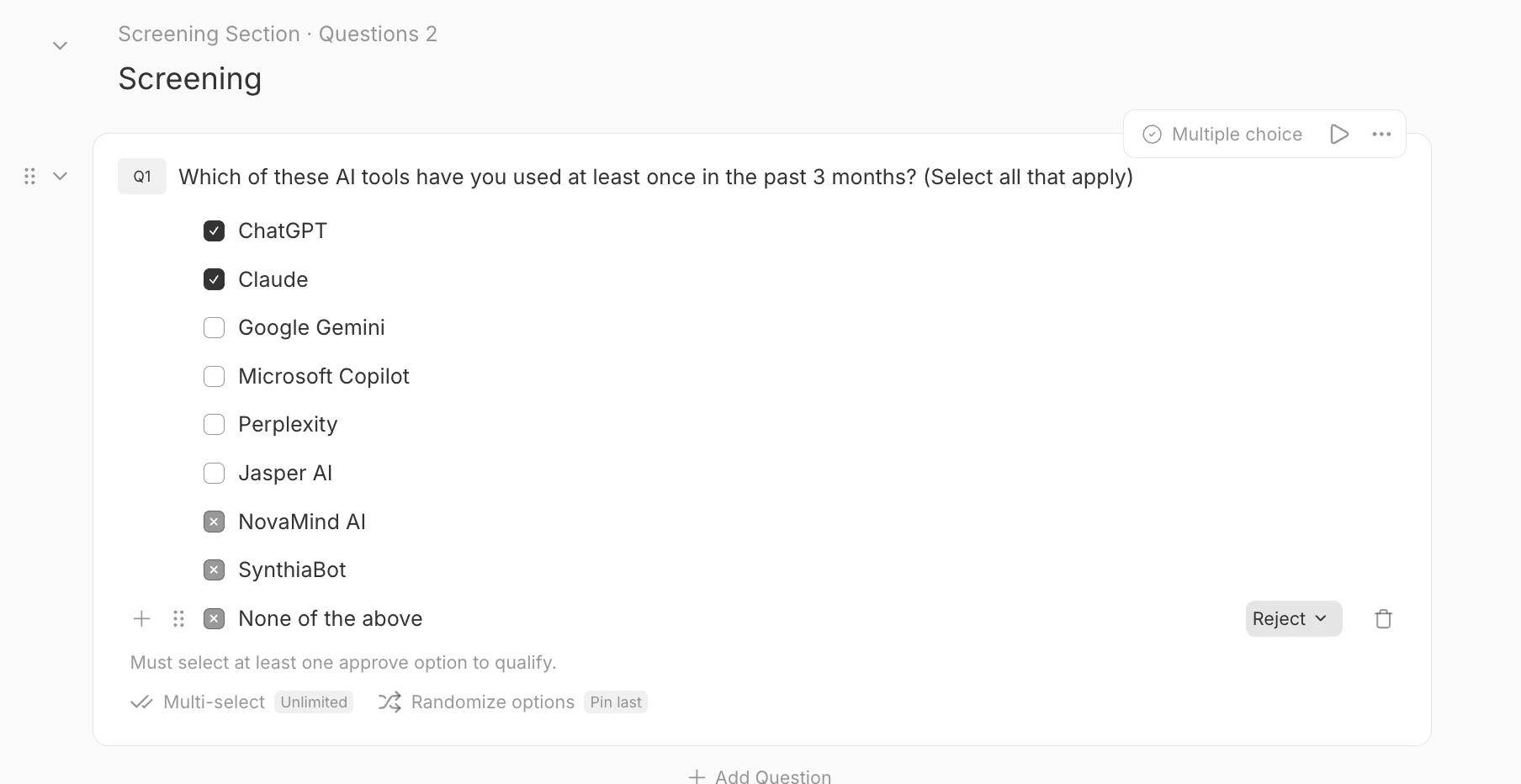
- For single-select questions, this will be either:
- Accept: participants that choose this option will advance.
- Reject: participants that choose this option will not advance.
- For multi-select questions, answer options will be either:
- Accept: participants MUST select an Accept option to continue.
- May Select: participants can select these options, but also must select an Accept option to advance.
- Reject: no matter what, participants who select these options will not advance, regardless of what else they choose.
- For single-select questions, this will be either:
- Test your flow. Preview the survey using the preview link to confirm participants are routed correctly.
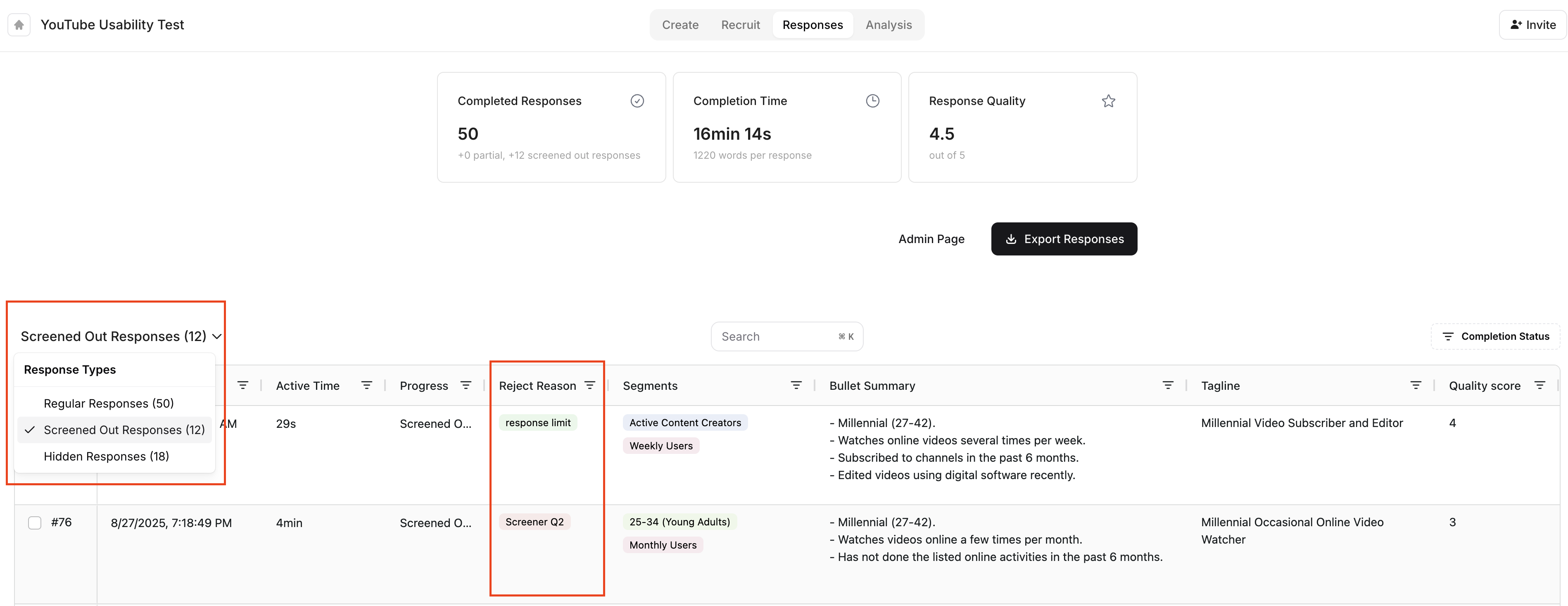
- Check how your screeners are impacting fielding. Go to the Responses tab and filter for “Screened out responses.” to see how many participants attempted your study but were disqualified, and for which screener question, be sure to untick “Complete” on the upper right side.
Incidence Rate: How Screeners Affect Cost
Survey screening questions connect directly to an important research concept: incidence rate (IR).- Definition: The incidence rate is the percentage of respondents who pass your screening questions and go on to participate in your survey.
- Every screener you add narrows your potential audience, lowering your IR.
- High IR (lots of respondents qualify) → lower cost per completed survey.
- Low IR (few respondents qualify) → higher cost, because you must screen many participants to find those who fit.
Best Practices For Screeners
Be specific. Ask targeted questions (e.g., “In the past month, how many hours per week have you spent streaming TV or movies?” rather than “Do you watch TV?”). Disguise your screeners and avoid yes/no questions. Make sure your qualifying logic isn’t obvious. Avoid telegraphing what the “right” answer is— for example, instead of asking “Do you subscribe to Apple TV+?” directly, include it as one option in a broader list of services and ask which they subscribe to. Also be sure your Study Title and Welcome Message don’t give away the passing screener answers. Funnel from general to specific. Start with broad questions (e.g., “Which of these streaming services do you currently subscribe to?”) before moving into more detailed ones (e.g., “How often do you watch original content on Apple TV+?”). This flow feels more natural to respondents and prevents disqualification from seeming abrupt. Keep it simple. Don’t use industry jargon or overly complex recall questions. Balance precision with practicality. Too strict criteria can lower your IR and drive costs up significantly. Focus on the factors most critical to your research, and consider proxy audiences when possible (e.g., instead of only screening for people who subscribed to Apple TV+ in the past month for a specific show, consider broadening to people who subscribe to any niche streaming service or regularly watch exclusive original content).- If your fielding is slow, examine which screeners are filtering the most people out and consider expanding.
When to use Screeners vs. Recruitment Criteria
When recruiting using Listen’s platform, broad demographics like age, gender, or household income can usually be handled in your recruitment settings. When participants join the panel, they are asked a set of general demographic questions (called pre-screeners), allowing us to target our outreach without needing to explicitly ask every question. More specific criteria—such as which brands someone uses, how recently they purchased a product, or detailed behaviors— should be asked as screener questions inside your survey.Using Screeners to Set Quotas
Screeners don’t just decide who qualifies— they also define the groups you’ll track if you are setting recruitment quotas. For example, if your screener asks about age, you can then set quotas to balance your sample across age brackets. 📖 Learn more about using quotas in our Guide to Using Quotas.Summary
Screening questions ensure your survey results come from the right people. They not only improve data quality and participant experience but also determine your incidence rate, which directly impacts study cost and fielding times. By placing screeners up front and following these best practices, you’ll save costs, improve your data, and deliver a better experience for participants.Anything missing? Let us know at support@listenlabs.ai and we’ll help you out!